

Decrypting View State Messages
Published: 23/01/2026
I recently had someone reach out to me with an interesting problem. They had found a 1316 event in their Windows application logs that contained a likely malicious view state. There was just one catch, it was encrypted. To make matters worse, all they had access to was a disk image of the host. After extracting the web.config file for the affected site, they found the compromised site had been configured with automatically generated keys. They were able to dump the autogen keys from the Windows registry, however they didn’t know how to use these to decrypt their view state.
The complexity of decrypting a view state ranges from trivial for legacy setups (simply drop the validation hash from the end of the buffer, then decrypt using the right key and symmetric algorithm) to complex for modern setups, which have historically involved using reflection to “trick” IIS into decrypting values for us. I usually rely on CyberChef to decrypt legacy view states and Blacklist3r for modern view states. Personally, I find both tools a little painful to use for decrypting view states, so I’ll share a new tool with you at the end of this post.
Coming back to our original problem, regardless of whether our encrypted view state is legacy or modern, having the autogen keys won’t do us much good; we’ll need the final machine keys if we want to decrypt it.
But how do you go from the autogen key blob stored in the registry or an LSA secret to a decryption key we can actually use?
This post will be a continuation of View State, The unpatchable IIS forever day being actively exploited, which I highly recommend reading before continuing with this post. In my previous post, I covered the key generation process at a high level and mentioned some of the modifiers that can be passed into the key generation process to ensure key uniqueness across applications; however, that post was heavily focused on the legacy (but still dominant) crypto configuration and barely mentioned the modern configuration that apps should be moving towards.
In this post, I’ll be covering:
- How the autogen keys are generated
- How the master machine keys are derived from the autogen keys
- How the final machine keys are derived from the master machine keys
- How the final keys can be used to decrypt view state messages
And this time, I’ll be covering all this for both the legacy and the modern crypto configurations.
What is an autogen key, and how is it generated?
“Autogen keys” feels like a poor name choice given they aren’t really keys, but that’s what Microsoft refers to them as in both their code and the registry, so we’ll stick with that here. 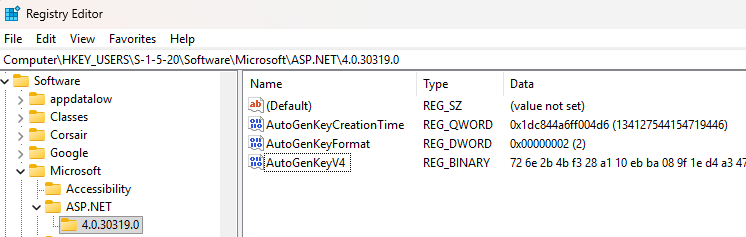 An autogen key is a
 1024-byte blob of data that contains the master IIS validation and decryption machine keys at specific offsets. This is the value that is stored in the registry or an (encrypted) LSA secret and is read at runtime.
We can see how this “key” is generated in System.Web.HttpRuntime::SetAutogenKeys():
Every
Namespace.Class::Functioncombo mentioned in this post can be found in theSystem.Webassembly in the .NET Framework.
internal static byte[] s_autogenKeys = new byte[1024];

private static void SetAutogenKeys()
{
    byte[] array = new byte[HttpRuntime.s_autogenKeys.Length];
    byte[] array2 = new byte[HttpRuntime.s_autogenKeys.Length];
    bool flag = false;
    RNGCryptoServiceProvider rngcryptoServiceProvider = new RNGCryptoServiceProvider();
    rngcryptoServiceProvider.GetBytes(array);
    if (!flag)
    {
        flag = UnsafeNativeMethods.EcbCallISAPI(IntPtr.Zero, UnsafeNativeMethods.CallISAPIFunc.GetAutogenKeys, array, array.Length, array2, array2.Length) == 1;
    }
    if (flag)
    {
        Buffer.BlockCopy(array2, 0, HttpRuntime.s_autogenKeys, 0, HttpRuntime.s_autogenKeys.Length);
        return;
    }
    Buffer.BlockCopy(array, 0, HttpRuntime.s_autogenKeys, 0, HttpRuntime.s_autogenKeys.Length);
}
The variable names generated by dbSpy aren’t very nice, so let’s clean things up a bit before diving in:
internal static byte[] s_autogenKeys = new byte[1024];

private static void SetAutogenKeys()
{
    byte[] randBytes = new byte[HttpRuntime.s_autogenKeys.Length];
    byte[] autogenKey = new byte[HttpRuntime.s_autogenKeys.Length];
    bool existingKeyLoaded = false;
    RNGCryptoServiceProvider rngcryptoServiceProvider = new RNGCryptoServiceProvider();
    rngcryptoServiceProvider.GetBytes(randBytes);
    if (!existingKeyLoaded)
    {
        existingKeyLoaded = UnsafeNativeMethods.EcbCallISAPI(IntPtr.Zero, UnsafeNativeMethods.CallISAPIFunc.GetAutogenKeys, randBytes, randBytes.Length, autogenKey, autogenKey.Length) == 1;
    }
    if (existingKeyLoaded)
    {
        Buffer.BlockCopy(autogenKey, 0, HttpRuntime.s_autogenKeys, 0, HttpRuntime.s_autogenKeys.Length);
        return;
    }
    Buffer.BlockCopy(randBytes, 0, HttpRuntime.s_autogenKeys, 0, HttpRuntime.s_autogenKeys.Length);
}
Much better.
When SetAutogenKeys is called (which happens as part of the HttpRuntime initalising), two 1024-byte arrays are defined. The first array, randBytes, is filled with random data whilst the second retains the default initalisation value of 0. Both arrays are passed to a function called EcbCallISAPI (which I believe stands for “Extension Control Block Call Internet Service API”) along with a constant called CallISAPIFunc.GetAutogenKeys. EcbCallISAPI acts as a bridge into several internal IIS functions, including the retrieval of autogen keys. We’re starting to get into native code here, so lets keep things high level. This function will attempt to load an existing autogen key from several locations, including the Local Security Authority (LSA) and several locations in the Windows registry. If an existing key is located, it will be copied into the passed in autogenKey byte array however if no existing key can be found, the contents of randBytes will be treated as a newly generated autogen key and stored in either the Local Security Authority or the Windows registry, depending on the privilages the current IIS application pool is running with, before being returned. See the Key Generation section of my previous post for more details on this process.
Finally, either the contents of autogenKey or randBytes are copied into the s_autogenKeys array, ready for use throughout the application.
From autogen keys to IIS machine keys
Now that we understand how an autogen key is generated, let’s look into how an IIS machine key is derived from this glorified byte array.
Moving forward, I’ll cover each topic for both legacy and modern crypto.
Legacy - Master machine key generation
Key generation, or rather key extraction, takes place in System.Web.Configuration.MachineKeySection::RuntimeDataInitialize(). The master validation key is simply the first 64 bytes of the autogen key, whilst the master decryption key is the subsequent 24 bytes.
private static int _AutoGenValidationKeySize = 64;
private static int _AutoGenDecryptionKeySize = 24;

private byte[] _ValidationKey;
private byte[] _DecryptionKey;

private void RuntimeDataInitialize(){
    ....
    // Validation Key Extraction
    Buffer.BlockCopy(HttpRuntime.s_autogenKeys, 0, this._ValidationKey, 0, MachineKeySection._AutoGenValidationKeySize);
    ....
    // Decryption Key Extraction
    Buffer.BlockCopy(HttpRuntime.s_autogenKeys, MachineKeySection._AutoGenValidationKeySize, this._DecryptionKey, 0, MachineKeySection._AutoGenDecryptionKeySize);
    ....
}
For example, take the following autogen key:
726E2B4BF328A110EBBA089F1ED4A347CB45FFA9D2164C9D7510320A96500330FA7D2516FC41CD03A925FD242979CFE08551B59846B21436B38A156D46C1FB6AFD0A2D2785BFE3F5C747A3E2FF29AFF77EFBC2852C26B93685FB784A613372491F668C85403F1427B409BE784B5E7142C0D8ABA49803463408D0661453EE1681D6E91EB9FEB846A40F21B8CADB347AD291134191B7FA6D44EFAC1718ED460EDEF50EFC782E9AB97B1CA948CD259B26FDEED6DA36CBC37083A82C96B58989918270204CAD473DC721A4F8D4412250B25582080064D05B1A964FFBBC5E9552918[TRUNCATED]The master validation key would be 726E2B4BF328A110EBBA089F1ED4A347CB45FFA9D2164C9D7510320A96500330FA7D2516FC41CD03A925FD242979CFE08551B59846B21436B38A156D46C1FB6A, whilst the master decryption key would be FD0A2D2785BFE3F5C747A3E2FF29AFF77EFBC2852C26B936.
Legacy - Deriving final machine keys
We’ve got our master machine keys now, but as you’ll recall from my previous post, they won’t do us much good, we need to derive the final machine keys for our specific application if we hope to decrypt anything.
The derivation process is a little complex and uses an internal, undocumented function that makes reimplementing this process in other languages very tedious. When configuring autogenerated machine keys, developers/admins can specify two parameters that can alter the key generation process, IsolateApps and IsolateByAppId, with IsolateApps being the default value. The derivation process also takes place in System.Web.Configuration.MachineKeySection::RuntimeDataInitialize().
When IsolateApps is set, a four-byte hash of the current app’s virtual path (e.g., / for the default app or /owa for a Microsoft Exchange OWA server) is calculated before being used in a series of bitwise operations against the master decryption key’s first 4 bytes:
int hash = StringUtil.GetNonRandomizedStringComparerHashCode(virtualPath);
this._DecryptionKey[0] = (byte)(hash & 255);
this._DecryptionKey[1] = (byte)((hash & 65280) >> 8);
this._DecryptionKey[2] = (byte)((hash & 16711680) >> 16);
this._DecryptionKey[3] = (byte)(((long)hash & (long)((ulong)(-16777216))) >> 24);
Similarly, when IsolateByAppId is set, a four-byte hash of the current application’s app id (e.g., /LM/W3SVC/1/ROOT for the default app) is calculated before being used in a series of bitwise operations against the master decryption key’s subsequent 4 bytes:
int hash = StringUtil.GetNonRandomizedStringComparerHashCode(appDomainAppId);
this._DecryptionKey[4] = (byte)(hash & 255);
this._DecryptionKey[5] = (byte)((hash & 65280) >> 8);
this._DecryptionKey[6] = (byte)((hash & 16711680) >> 16);
this._DecryptionKey[7] = (byte)(((long)hash & (long)((ulong)(-16777216))) >> 24);
Both of these values can be found in your 1316 Windows event log entry. The appId can be extracted from the Application domain line, whilst the application virtual path is two lines below. 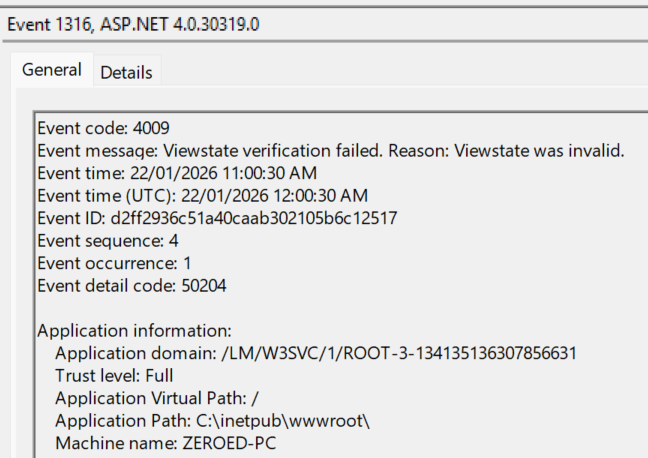
The code above shows the calculation of the decryption key however, the process is identical for the validation key.
In the
Modern - Deriving final machine keyssection, you’ll find a mention of integrating an optional view state user key into our key calculation. Whilst legacy view states still support user keys, they are only used in the generation of a small chunk of data, which is appended to the view state data prior to encrypting and hashing. This means we can successfully decrypt and even validate a legacy view state without knowing the user key.
Now for the annoying part, GetNonRandomizedStringComparerHashCode ultimately calls the following undocumented function, which calculates the actual hash. I haven’t been able to pin down how this function works, and annoyingly, this function changed in the newer, open source versions of .NET, so any time I need to calculate one of these keys, I need to use the .NET Framework.
[DllImport("QCall", CharSet = CharSet.Unicode)]
private static extern int InternalGetGlobalizedHashCode(IntPtr handle, IntPtr handleOrigin, string localeName, string source, int length, int dwFlags, bool forceRandomizedHashing, long additionalEntropy);
Modern - Master machine key generation
When using the modern crypto setup, our machine keys are the result of calculating the HMACSHA512 sum of several values, depending on how our key generation was configured.
Internally, IIS tracks these values in a class called Purpose, which is more or less just a wrapper around a string (the primary purpose) and a list of strings (secondary purposes).
The primary purpose is set in System.Web.Security.Cryptography.MachineKeyMasterKeyProvider::GenerateCryptographicKey() to the hard-coded string MachineKeyDerivation, whilst the secondary purpose is determined by the IsolateApps and IsolateByAppId key generation parameters:
- If
IsolateAppswas specified in our key generation parametersIsolateApps: appNameis appended to the secondary purpose list, whereappNameis the path the target app is hosted at (e.g.,/or/owa)
- If
IsolateByAppIdwas specified in our key generation parametersIsolateByAppId: appIdis appended to the secondary purpose list, whereappIdis the application’s id (e.g.,/LM/W3SVC/1/ROOT)
The “decryption key” component of the autogen key is extracted in System.Web.Security.Cryptography.MachineKeyMasterKeyProvider::GetEncryptionKey() by taking the first 32 bytes of data from the autogen key.
Next, a hasher is set up in System.Web.Security.Cryptography.SP800_108::DeriveKey():
public static CryptographicKey DeriveKey(CryptographicKey keyDerivationKey, Purpose purpose)
{
    CryptographicKey cryptographicKey;
    using (HMACSHA512 hmacsha = CryptoAlgorithms.CreateHMACSHA512(keyDerivationKey.GetKeyMaterial()))
    {
        byte[] label;
        byte[] context;
        purpose.GetKeyDerivationParameters(out label, out context);
        byte[] array3 = SP800_108.DeriveKeyImpl(hmacsha, label, context, keyDerivationKey.KeyLength);
        cryptographicKey = new CryptographicKey(array3);
    }
    return cryptographicKey;
}
Note that keyDerivationKey in the above code refers to the bytes we extracted from the autogen key. This means that the bytes we extracted from the autogen key are used as the key to the HMACSHA512 hasher.
The primary and secondary purposes are then prepared for hashing by converting them to byte arrays. This is trivial for the primary purpose but slightly more involved for the secondary. This process takes place in System.Web.Security.Cryptography.Purpose::GetKeyDerivationParameters().
internal void GetKeyDerivationParameters(out byte[] label, out byte[] context)
{
    if (this._derivedKeyLabel == null)
    {
        this._derivedKeyLabel = CryptoUtil.SecureUTF8Encoding.GetBytes(this.PrimaryPurpose);
    }
    if (this._derivedKeyContext == null)
    {
        using (MemoryStream memoryStream = new MemoryStream())
        {
            using (BinaryWriter binaryWriter = new BinaryWriter(memoryStream, CryptoUtil.SecureUTF8Encoding))
            {
                foreach (string text in this.SpecificPurposes)
                {
                    binaryWriter.Write(text);
                }
                this._derivedKeyContext = memoryStream.ToArray();
            }
        }
    }
    label = this._derivedKeyLabel;
    context = this._derivedKeyContext;
}
In the above function, our primary purpose (MachineKeyDerivation) is converted to a byte array whilst each of our secondary purposes are written to a MemoryStream via a BinaryWriter before being converted to a byte array.
This can be hard to visualise, so let’s take a look at an example. Assuming we are generating the key for a site hosted at / configured with IsolateApps, the output for GetKeyDerivationParameters would be:
Label:
00000000 4d 61 63 68 69 6e 65 4b 65 79 44 65 72 69 76 61 74 69 6f 6e |MachineKeyDerivation|Context:
00000000 0e 49 73 6f 6c 61 74 65 41 70 70 73 3a 20 2f 00 00 01 00 |.IsolateApps: /....|Note that a random byte of 0x0e has been inserted at offset 0x00 of context. This is a quirk of using BinaryWriter and is actually the length of the subsequent string (i.e., 0x0e means the following string is 14 bytes long).
Finally, back in DeriveKey(), a call is made to System.Web.Security.Cryptography.SP800_108::DeriveKeyImpl() to perform the hashing:
private static byte[] DeriveKeyImpl(HMAC hmac, byte[] label, byte[] context, int keyLengthInBits)
{
    int num = ((label != null) ? label.Length : 0);
    int num2 = ((context != null) ? context.Length : 0);
    checked
    {
        byte[] array = new byte[4 + num + 1 + num2 + 4];
        if (num != 0)
        {
            Buffer.BlockCopy(label, 0, array, 4, num);
        }
        if (num2 != 0)
        {
            Buffer.BlockCopy(context, 0, array, 5 + num, num2);
        }
        SP800_108.WriteUInt32ToByteArrayBigEndian((uint)keyLengthInBits, array, 5 + num + num2);
        int num3 = 0;
        int i = keyLengthInBits / 8;
        byte[] array2 = new byte[i];
        uint num4 = 1U;
        while (i > 0)
        {
            SP800_108.WriteUInt32ToByteArrayBigEndian(num4, array, 0);
            byte[] array3 = hmac.ComputeHash(array);
            int num5 = Math.Min(i, array3.Length);
            Buffer.BlockCopy(array3, 0, array2, num3, num5);
            num3 += num5;
            i -= num5;
            num4 += 1U;
        }
        return array2;
    }
}
This is a chunky function, but all it’s doing is mashing the label and context fields into a new array before passing it to the hasher.
For example:
00000000  00 00 00 01 4d 61 63 68 69 6e 65 4b 65 79 44 65 72 69 76 61 74 69 6f 6e  |....MachineKeyDerivation|
00000018  00 0e 49 73 6f 6c 61 74 65 41 70 70 73 3a 20 2f 00 00 01 00              |..IsolateApps: /....|
Following the call to hmac.ComputeHash(array) (where array is the above example value), array3 will contain a 64-byte hash. The first n bytes of this hash (where n is the length of the input key) will be returned as our master decryption key.
The above process is then repeated for the validation key, the only difference being which bytes are extracted from the autogen key. For the validation key, this is 32 bytes after the decryption key. I have no idea why they decided to reverse the order in the modern configuration.
Modern Crypto Compatibility
Interestingly, the modern crypto setup appears to have been designed solely with AES in mind, which makes sense; however, this leads to some difficult to track down errors when attempting to use DES and Triple DES. To make things extra confusing, whether or not you encounter these errors not only depends on the decryption algorithm in use, but also on whether you are using auto-generated or static keys.
This issue boils down to the key sizes supported by each algorithm. When a static key is generated, the key generated is 24 bytes, whilst when an auto-generated key is used, the resulting key is 32 bytes.
So we have two possible key lengths, 24 bytes and 32 bytes (as the key derivation function we just discussed maintains the original key length, this won’t affect this issue).
If we compare these sizes with the key sizes supported by the various algorithms, the issue becomes obvious:
- AES - 16, 24, 32
- TripleDES - 16, 24
- DES - 8
AES supports both 24 and 32-byte keys, so it can handle static and auto-generated keys (using auto-generated keys will result in AES256 being used vs AES192 when using static keys).
TripleDES supports 24 but not 32-byte keys, so static keys will work fine, but auto-generated keys will throw an error when attempting to generate an encrypted view state.
DES supports neither and will always error out.
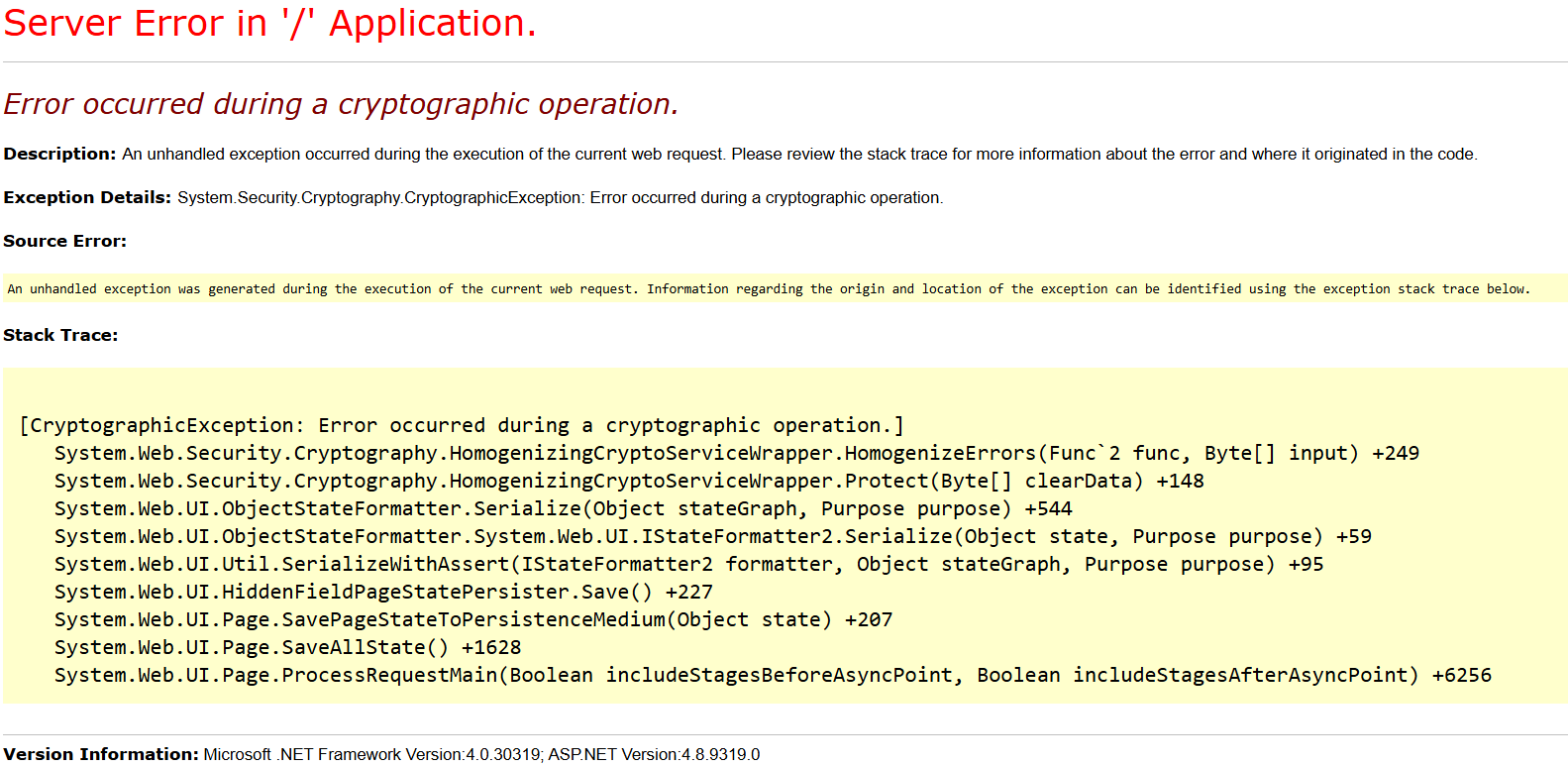
As many tools like YSoSerial work by invoking IIS’ internal assemblies via reflection, they will encounter the same error:
PS C:\Users\Zeroed\Downloads\ysoserial\Release> .\ysoserial.exe -p ViewState -g ActivitySurrogateSelectorFromFile -c ".\payload.cs;System.dll;System.Web.dll" --validationalg="HMACSHA256" --path="/machineKeyFinder.aspx"  --apppath="/"  --validationkey="330F1AC9BC501C99CEB2FC8981FAD390D35D558961A87075F12EC4C1F942575A" --decryptionkey="D1A4613CD8D0258ECA117D03131D6E71B6EE72760CD087CE37693F7920551CB0" --decryptionalg="3DES" --showraw

Unhandled Exception: System.Reflection.TargetInvocationException: Exception has been thrown by the target of an invocation. ---> System.Security.Cryptography.CryptographicException: Error occurred during a cryptographic operation.
   at System.Web.Security.Cryptography.HomogenizingCryptoServiceWrapper.HomogenizeErrors(Func`2 func, Byte[] input)
   at System.Web.Security.Cryptography.HomogenizingCryptoServiceWrapper.Protect(Byte[] clearData)
   --- End of inner exception stack trace ---
   at System.RuntimeMethodHandle.InvokeMethod(Object target, Object[] arguments, Signature sig, Boolean constructor)
   at System.Reflection.RuntimeMethodInfo.UnsafeInvokeInternal(Object obj, Object[] parameters, Object[] arguments)
   at System.Reflection.RuntimeMethodInfo.Invoke(Object obj, BindingFlags invokeAttr, Binder binder, Object[] parameters, CultureInfo culture)
   at ysoserial.Plugins.ViewStatePlugin.generateViewState_4dot5(String targetPagePath, String IISAppInPath, String viewStateUserKey, Byte[] payload) in D:\a\ysoserial.net\ysoserial.net\ysoserial\Plugins\ViewStatePlugin.cs:line 405
   at ysoserial.Plugins.ViewStatePlugin.Run(String[] args) in D:\a\ysoserial.net\ysoserial.net\ysoserial\Plugins\ViewStatePlugin.cs:line 297
   at ysoserial.Program.Main(String[] args) in D:\a\ysoserial.net\ysoserial.net\ysoserial\Program.cs:line 169
Not that this is an issue, there’s no point generating a valid encrypted view state if IIS is going to crash trying to decrypt it.
Modern - Deriving final machine keys
Generating our master machine keys was pretty complex, thankfully going from master machine keys to final machine keys uses a very similar process.
Once again, a Purpose is created, this time in System.Web.UI.HiddenFieldPageStatePersister::Load() with a primary purpose of WebForms.HiddenFieldPageStatePersister.ClientState.
In System.Web.UI.ObjectStateFormatter::GetSpecificPurposes(), the following two secondary purposes are added:
TemplateSourceDirectory: virtualPathis appended to the secondary purpose list, wherevirtualPathis the root directory of the current app (e.g.,/for the default app or/owafor a Microsoft Exchange OWA server)Type: PAGETYPEis appended to the secondary purpose list wherePAGETYPEis the class type of the compiled aspx page being accessed, converted to upper case- Typically, this will be the file name of the ASPX file that was accessed with the
.replaced with an_, e.g.mypage.aspx->MYPAGE_ASPX
- Typically, this will be the file name of the ASPX file that was accessed with the
If a view state user key has been configured, this will be added as an additional secondary purpose:
ViewStateUserKey: viewStateUserKey, whereviewStateUserKeyis the view state user key for the current request
From here, everything’s the same as the generation of our master machine key (i.e., it’s the exact same code as before). We set up a HMACSHA512 hasher, keyed with our master machine key (decryption or validation, depending on what we’re trying to generate), convert our Purpose into a byte array, hash it, and extract the first n bytes as our final key.
Decrypting View States
Now that we’ve generated our final machine keys, how can we use them to decrypt our view state? Thankfully, the decryption process is dead simple and is very similar for both configurations.
Before we decrypt our view state message, we’ll need to clean it up a little. These steps will be the same for both configurations.
First, we base64 decode our encrypted view state message. Next, we need to strip the validation hash from the end of the decoded value. The size of this hash will depend on the hashing algorithm used.
If you want to validate your view state, simply hash the remaining byte array with the correct validation algorithm (initialised with the final validation key). The resulting hash should match the hash you stripped of your view state.
The below function will hash the data component of a view state and compare it with the validation hash stored at the end of the data array:
public override bool Validate(byte[] data, byte[] validationKey)
{
    var expectedHash = new byte[HashSize];
    Array.Copy(data, data.Length - expectedHash.Length, expectedHash, 0, expectedHash.Length);
    data = data.Take(data.Length - expectedHash.Length).ToArray();
    using (var hmac = new HMACSHA256(validationKey))
    {
        var computedHash = hmac.ComputeHash(data);
        return expectedHash.SequenceEqual(computedHash);
    }
}
Legacy - Decrypting view states
To decrypt a legacy view state, simply decrypt it using the correct decryption algorithm with the final decryption key and an IV of all 0x00s.
The resulting byte array will have keyLength random bytes prepended; simply drop these off (I assume these bytes were added to prevent encryption of the same value resulting in the same cipher text, you know, that thing you’re meant to use a random IV to prevent). Note that keyLength will be a different value depending on the algorithm used, but should always be a multiple of 8. If you end up with a value beginning with 0xFF01 (and more importantly, containing plenty of English), then congratulations, you’ve decrypted your view state message.
Modern - Decrypting view states
To decrypt a modern view state, extract the first blockSize bytes from the start of the byte array; this is your IV. Then decrypt the remaining bytes using your final decryption key and your newly extracted IV. If you end up with a value beginning with 0xFF01 (and more importantly, containing plenty of English), then congratulations, you’ve decrypted your view state message.
VSRipper
We’ve dug deep into the guts of view state key generation, derivation and decryption in this post, but even with all this information, writing a view state decryptor capable of handling key derivation along with all the combinations of validators and decryptors for both legacy and modern sounds like a massive pain in the ass, which is why I’ve done it for you!
VSRipper is a utility I’ve written to take the pain out of view state decryption. It supports decrypting all modern and legacy payloads using known keys and includes a brute forcer which can take an autogen key, derive all modern and legacy keys from it and then attempt to perform a decryption using every algorithm combination. 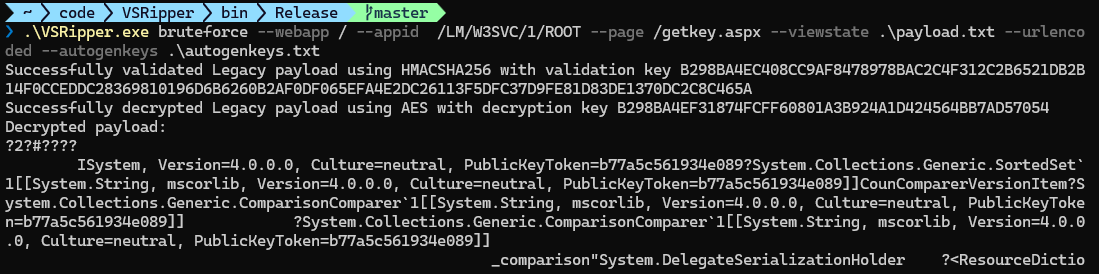
Conclusion
Thats it for this post. If you come across any interesting view state messages or find VSRipper useful, then be sure to let me know.
If you’re interested in learning more about view state exploitation along with heaps of other IIS exploitation and defence techniques, be sure to checkout my course Advanced IIS Post Exploitation, Detection & Evasion.